Getting started
Three decisions and you are in a position: which trader, which direction, how much leverage. Everything else on the screen exists to make those three decisions well.
The mechanic
- 1Pick a traderTen fomo leaderboard names, one perpetual market each. The index is the trader's rolling seven-day return on the capital he actually has in positions; 100 means flat over the window.
- 2Pick a sideLong if you think he is about to run hot, short if you think he is done. Hourly funding prices the crowd's opinion: the premium on a trader is the sentiment.
- 3Pick a sizeLeverage is capped per trader by realised volatility. Steady grinders get 100x, memecoin snipers get 5 to 10x. Liquidations trigger and settle on the index, never on a thin book, and take at most the margin.
Your demo account
There is no sign-up. The first time you open the terminal you get a paper account with $100,000 USDC, held in a cookie in your browser. Claim a handle from the order panel to get a public profile, a spot on the leaderboard and a shareable result card. Reset returns the account to $100,000 and clears positions and orders; your fills before the reset stay in history.
Paper collateral, real mechanics. Funding is charged, liquidations happen, and a bad week on the leaderboard is public. The demo leaderboard doubles as the whitelist story for going live, so it is worth taking seriously.
The terminal
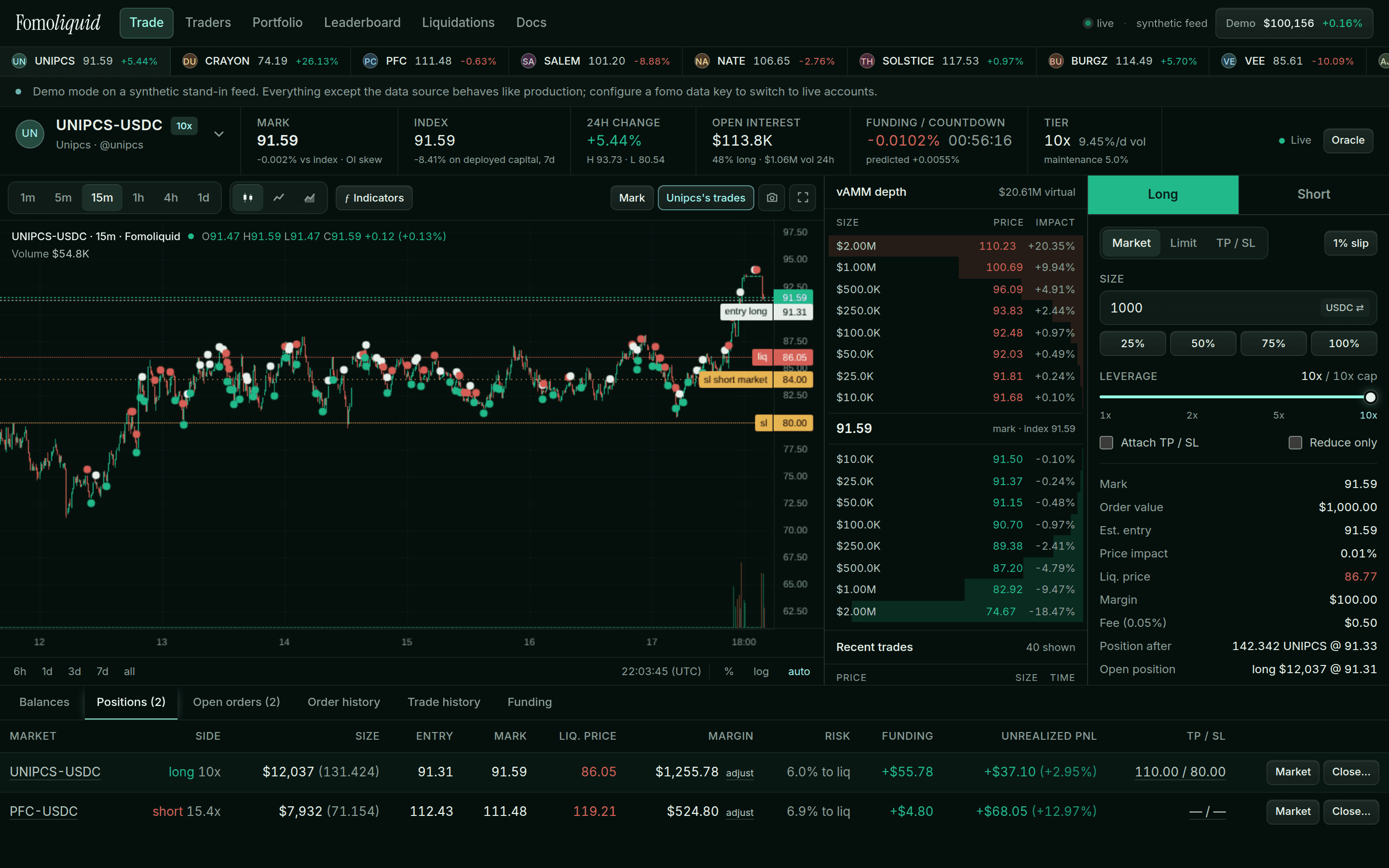
- Markets strip. Every market with its mark and 24h move. One click to switch. Beside each, L and S send a market order of your quick size and leverage in one tap, set in the order panel's settings next to the slippage limit and hidden while orders are confirmed before sending. The selector below it searches by trader, ticker or handle.
- Keyboard. Outside a text box: B or S picks the side and puts the cursor in the size box, M or L the order type, 1 to 4 size a quarter to all of your buying power, [ and ] step the leverage, Enter sends, X closes the position here after a confirmation, J and K move between markets, / searches traders and ? shows the list.
- Header. Mark, index (with the index percent on deployed capital), 24h change with high and low, open interest with the long share, funding with the countdown to the next payment, and the market's leverage tier with the realised volatility that set it.
- Chart. The mark, where the market trades, as candles, line or area, with the index drawn over it as a line and the trader's own trades as markers, so your fills sit on the candles that produced them. Your entry, liquidation, take profit, stop loss, resting orders and pending triggers are drawn as labelled lines. Hover for the navigation bar; the toolbar has intervals, indicators, the index overlay, a snapshot and fullscreen, and the tools down the left edge draw trend lines, horizontal lines and a measure box that pan and zoom with the candles and are kept per market. Volume sits in its own pane with a twenty-bar average. Under it, the trader's own dollars over the last seven days: the PnL the index is built from as a line and the capital at risk it is measured against as a shaded area, per bar, so any move on the chart can be checked against the money behind it; both panes can be switched off in the Indicators menu. Scroll left and older candles load from the store a screen at a time, back to the first bar ever recorded. The trader's own page charts the index itself.
- Depth and tape. A vAMM has no order book. The ladder shows what buying or selling each size would do to the mark; below it, recent fills.
- Order panel and tabs. Described next.

Placing an order
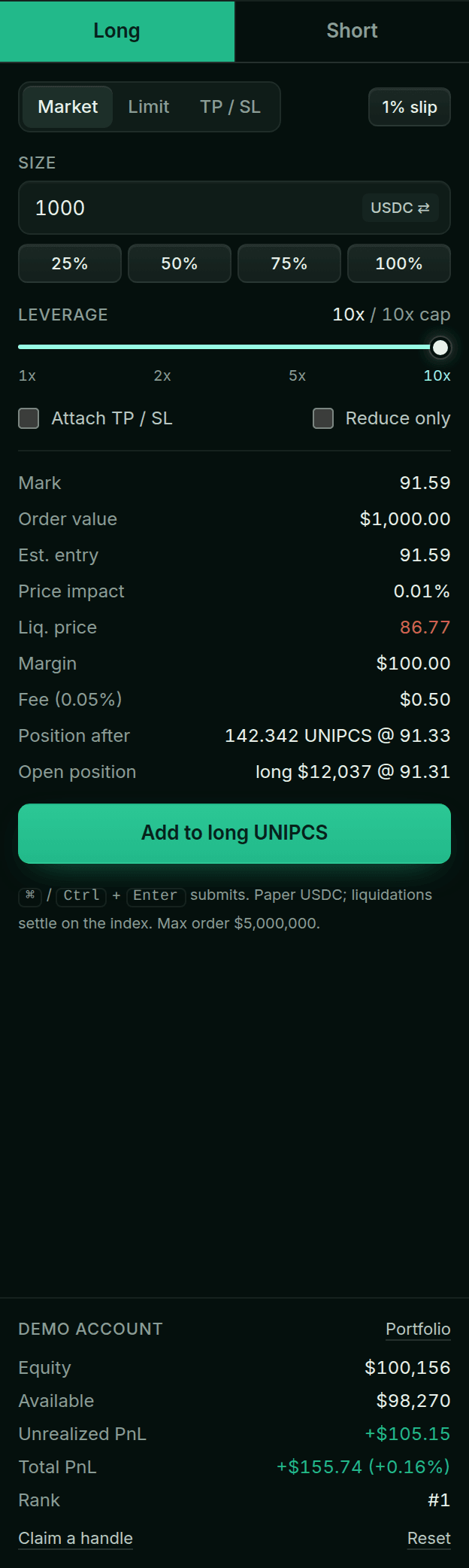
- 1Choose Long or ShortThe side is the side of the order. To exit a long you place a short, or use the position's own close controls.
- 2Choose the order kindMarket executes now against the curve. Limit rests at your price with GTC, IOC or post-only. TP / SL places a trigger order that waits for the mark to cross a price. See Order types.
- 3Size itIn USDC or in units of the index; the toggle sits inside the field. The quick buttons take a percentage of your buying power, or of your position when the order reduces it.
- 4Set leverageThe slider is capped at the market's tier. Margin is size divided by leverage and is locked to the position; it never mixes with other positions.
- 5Read the summaryEstimated entry, price impact, liquidation price, margin and fee update as you type. Attach a take profit and stop loss and the panel shows the PnL at each.
- 6SubmitClick, or press Ctrl / ⌘ + Enter. Turn on order confirmations in the settings chip if you want a review step.
Managing a position

- Balances shows equity, available, margin in positions, unrealized and realized PnL, fees and funding.
- Positions lets you edit TP / SL inline, add or remove margin, close a percentage at market, or rest a limit close.
- Open orders lists resting limits and waiting triggers with a cancel-all. Order history keeps every fill, cancel and rejection with the reason.
- Trade history and Funding record every fill and every hourly payment.
Leaderboard, profiles and share cards
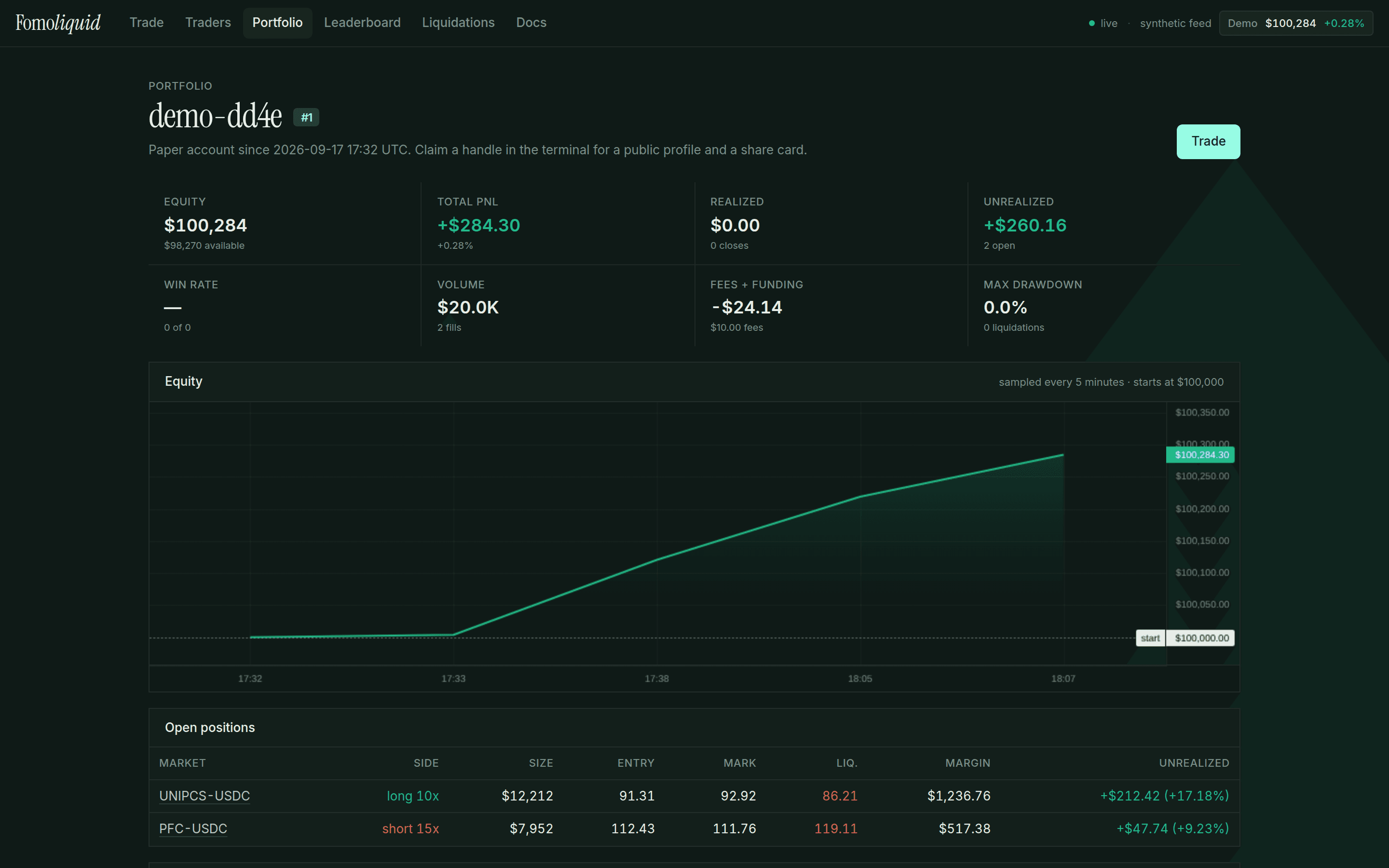
Every account that has traded is ranked by paper PnL on the leaderboard. A claimed handle gives you a public profile at /u/handle with positions and recent fills, and a result card image you can post. Bots, when a deployment runs them for liquidity, never rank.